
Download Creatures Icons – monsters, desktop icons, fun icons, playful, cute, whimsical, unique, quirky, humor, creative, expressive, character, personalization, desktop customization
Overview
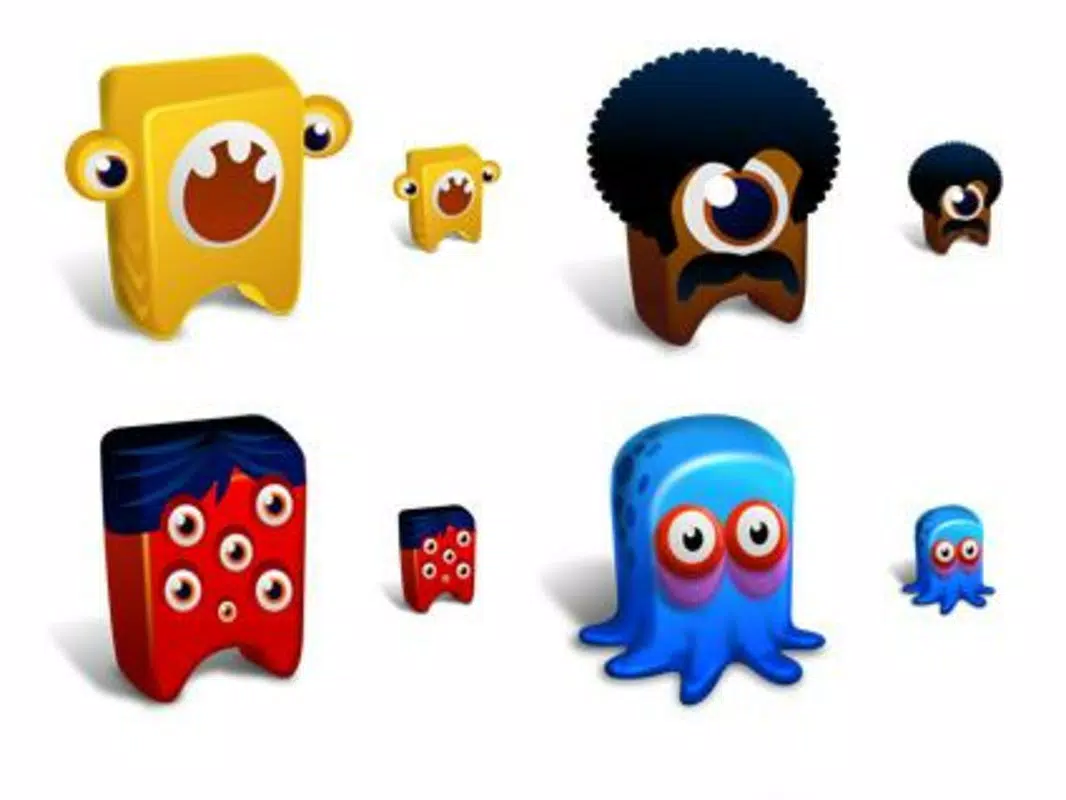
The Creatures Icons app offers a lighthearted approach to desktop personalization, bringing a whimsical touch to digital workspaces across multiple platforms. Designed as a utility tool, it provides users with a curated collection of twelve unique monster-themed icons, each representing a distinct and quirky character. These icons are intended to add humor and personality to desktop environments, enabling users to express their individuality through visual customization. The app serves as a creative solution for individuals seeking to break away from standard, utilitarian desktop aesthetics and embrace a more playful digital atmosphere.
Targeted primarily at users who value self-expression and enjoy creative personalization, Creatures Icons appeals to both casual users and enthusiasts of digital art and design. The app’s straightforward functionality makes it accessible to users of varying technical skill levels, allowing for quick and easy integration into existing workflows. Though originally released in 2007, the tool remains relevant due to its simplicity and enduring charm. The developer, Eddie C. Reardon, has provided a freely available resource that continues to serve users across Linux, Mac, and Windows systems.
Real-world use cases include enhancing productivity by creating a more enjoyable workspace, adding fun to presentations or shared devices, and serving as a creative outlet for users who appreciate expressive digital environments. In the broader app ecosystem, Creatures Icons stands out as a niche yet enduring example of minimalist, user-driven customization tools that prioritize fun and accessibility over complexity.
Key Features & Functionality
- Twelve Unique Monster Characters: Each icon in the pack represents a distinct creature, from a three-eyed being to a living refrigerator, ensuring a diverse range of visual styles and personalities. This variety allows users to choose an icon that reflects their mood or sense of humor.
- Simple Naming Convention: Icons are labeled with intuitive names such as 'Tentacles' and 'Big Eyes,' enabling users to quickly identify and select their preferred design without confusion or the need for additional reference materials.
- Playful and Whimsical Aesthetic: The design language emphasizes fun, creativity, and humor, with exaggerated features and cartoonish expressions that add a lighthearted tone to any desktop setup.
- Cross-Platform Accessibility: The icon pack is compatible with Linux, Mac, and Windows systems, offering broad usability and ensuring that users across different operating environments can enjoy the same expressive tools.
- Easy Download and Installation: Available through the official website, the pack can be downloaded and applied with minimal effort, making it ideal for users seeking a fast and hassle-free personalization experience.
For example, a user might choose the 'Living Fridge' icon to represent a file folder containing recipes, turning a mundane task into a humorous interaction. Similarly, someone might use the 'Three-Eyed Creature' icon for a project folder to reflect a creative, multi-perspective approach. These real-world applications demonstrate how simple visual elements can enhance both functionality and emotional engagement with digital tools.
Interface, UX & Performance
The interface of Creatures Icons is minimal and functional, as the app does not include a traditional UI beyond the icon files themselves. Users interact with the content directly through their operating system’s file management system, applying the icons to folders or files as needed. The visual style is consistent with the playful theme—bright colors, exaggerated shapes, and expressive features that stand out without overwhelming the desktop environment.
Navigating the icon pack is straightforward, relying on clear naming and file organization. There are no complex menus, settings, or configuration steps, which contributes to a seamless user experience. The simplicity of the design reduces cognitive load and ensures that users can focus on customization rather than technical setup.
Although the developer did not list formal performance metrics, the app’s small file size of 56 KB suggests efficient resource usage. It is likely to run smoothly on a wide range of devices, including older or lower-spec systems. Responsiveness is expected to be high due to the static nature of the icon files. Stability is not reported, but the lack of dependencies and the minimal code footprint imply a low risk of crashes or conflicts.
Platform Compatibility & Technical Requirements
Creatures Icons is available for Linux, Mac, and Windows platforms, making it accessible to a broad user base across different operating systems. The app is designed to function on standard desktop environments without requiring specialized hardware or software. The file size is 56 KB, indicating a lightweight footprint that minimizes storage impact and download time.
The software version is 1.0, suggesting a stable, finalized release with no known updates or development activity since its 2007 release. The developer did not specify minimum OS requirements, so compatibility with modern versions of Linux, Mac, and Windows cannot be confirmed with certainty. However, the simplicity of the file format and lack of dependencies suggest that it may still function on updated systems through manual installation.
Pros and Cons
Pros
- Lightweight and fast to download and install
- Free to use with no hidden costs or ads
- Simple, intuitive naming for easy navigation
- Appealing, playful design that enhances desktop enjoyment
- Available across multiple operating systems
Cons
- No official support or updates since 2007
- Compatibility with modern OS versions not confirmed
- Limited to static icon files—no dynamic or interactive features
- No in-app guidance or user documentation provided
- Small feature set may not suit advanced users
FAQ
Is Creatures Icons safe to download?
The app is available through the official website and is free of known malware. However, users should always verify the source before downloading.
Can I use Creatures Icons on my smartphone?
There is no indication that the app is designed for mobile platforms. It is intended for desktop use on Linux, Mac, and Windows systems.
How do I install the icons on my desktop?
Users can download the icon files from the official site and apply them to folders or files using their operating system’s standard icon customization tools.
Are the icons compatible with Windows 11?
While the developer did not specify compatibility, the lightweight nature of the files suggests it may work on modern Windows versions, though no guarantees are provided.
Is there a newer version of Creatures Icons available?
The current version is 1.0, and no updates have been released since 2007. Users should proceed with caution when using outdated software on modern systems.
Final Thoughts
Creatures Icons remains a charming, low-friction tool for users who value creativity and humor in their digital spaces. Despite its age, its lightweight design, free access, and cross-platform availability continue to offer value to those seeking a fun way to personalize their desktops. While it lacks modern features and ongoing support, its simplicity and unique aesthetic make it a standout in the utility category.
Those who enjoy quirky personalization, nostalgic digital tools, or creative expression will find the most benefit from this app. For users looking to inject personality into their work environment without complexity, Creatures Icons delivers a genuine sense of delight.
Download Creatures Icons now


